
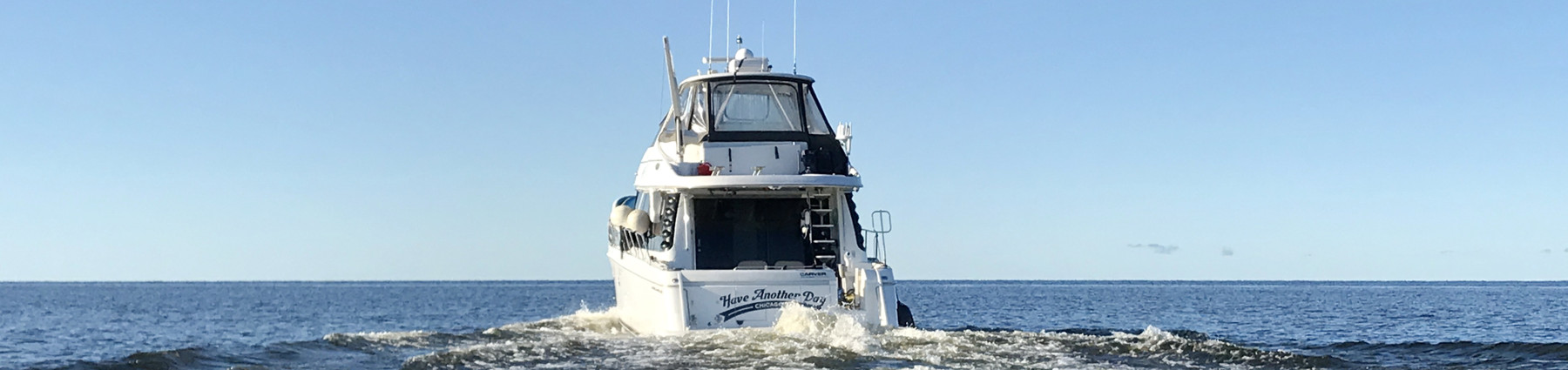
$50 and four hours: an AI-built NMEA 2000 display
I’ve been trying to figure out how to write about artificial intelligence’s role in home-built marine electronics for the better part of a year, and I still don’t have a clean answer. I’m going to write it anyway. Here’s what I’ve learned about what AI can actually do for you, where it falls down, and what happens when it doesn’t. The opportunity is real; you can finally build your instrumentation and navigation electronics exactly the way you want it. But so are the potential pitfalls. AI will happily put someone with limited knowledge deep in the bowels of their own navigation electronics. On a boat, that can get dangerous.
I have a computer science degree and have been writing code for a (depressingly) long time. Over the last year I’ve gone from writing all my own code, to handing AI the repetitive parts, to nearly exclusively describing what I want and letting it run. My battery testing relies on a lot of automated data collection and analysis. Much of that data moves over CAN bus — the same technology that provides the foundation for NMEA 2000 — so the work looks a lot like what you’d do on a marine network. At this point, the majority of the code running my test rigs is written by AI. Ceding that has let me focus on the analysis and conclusions instead of the mechanics.
For years, one of the most common concerns I hear from boaters is the cost of marine electronics versus broad market products. Narrowly focused marine electronics cost more than a smartphone or tablet, often several times more. Instrument displays like the Raymarine i70S, Garmin GMI20, Furuno FI70, and Simrad IS35 and IS42 all command at least $400. All these products use a few physical buttons located below the display. They also all use sunlight-viewable displays and excellent weather sealing. A large chunk of the cost of these gauges comes from the high-brightness displays and environmental hardening. That fortification may not be necessary for instruments that will live in a pilothouse or other enclosed environment.
What if you could make your own display? First, an acknowledgement that creating your own displays has been possible for some time using tools like Signal K server and a tablet. What if you could spend $50 on a display and a few hours with your friend Claude or ChatGPT and create your own? Well, you can. And I think that effort will both prove interesting to those of us who love to tinker, and also informative about the challenges of building solid, reliable equipment that is ready to go to sea with you. Everything above is genuinely impressive, but there are also significant reasons for caution. We will talk about those in a bit.
Create your own gauge / MFD
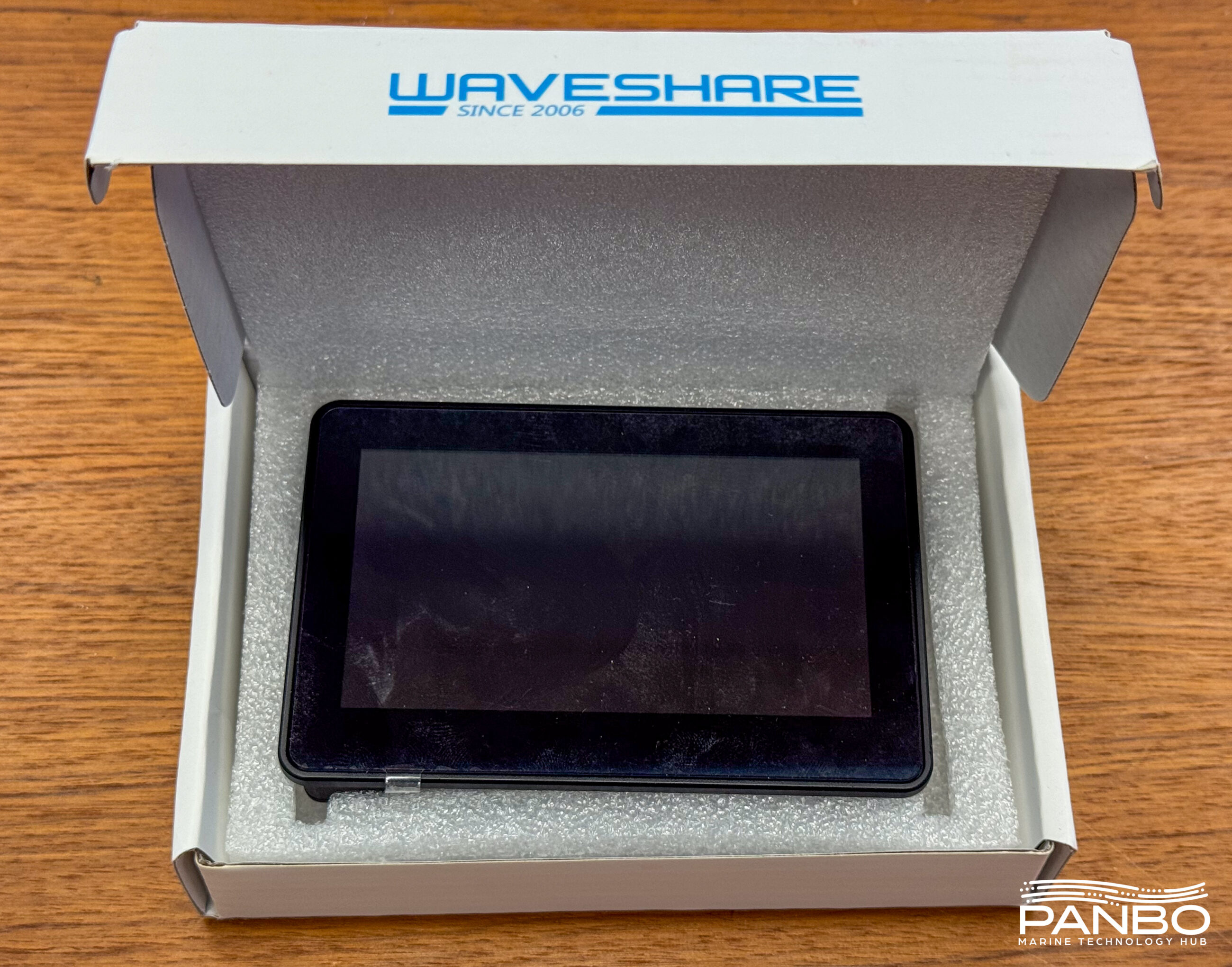
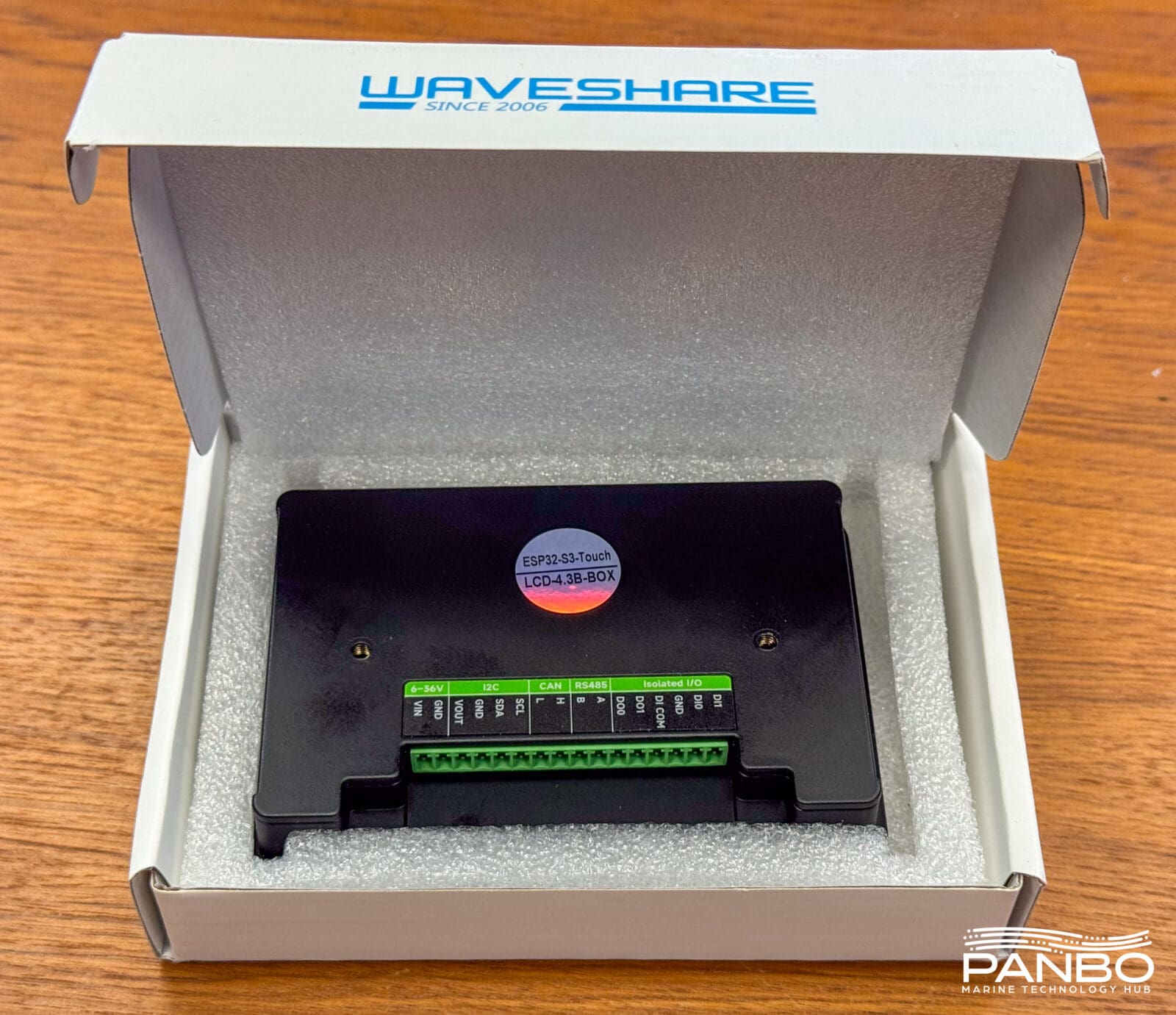
To write this article, I started with a blank sheet of paper. No code or existing system. Just an idea of what I wanted and a freshly delivered package from Amazon. First, I pulled a brand new Waveshare ESP32-S3-Touch-LCD-4.3B-BOX out of the box. Let’s break down what that means. Waveshare is a company that makes a huge variety of electronic modules for makers, engineers, and others. The ESP32-S3 in the product name indicates the unit contains an ESP32-S3 microcontroller. ESP32s are a family of microcontrollers or embedded computers with numerous interfaces capable of myriad tasks. Smartplugs, home alarms, and countless other products use ESP32s to deliver their functionality. This particular model has a 4.3-inch, IPS, touchscreen display in a box enclosure. Additionally, this model has WiFi, Bluetooth, a CAN bus interfac, I2C, RS485, and a few analog I/Os. Frankly, it’s a shockingly capable hardware for a hair over $50.
With my shiny new ESP32 out of the box, I plugged it into my computer and downloaded the Waveshare sample project for the display. The sample project provides a starting point for the libraries that interface with the hardware. With that in place, I pointed Claude Code at the directory on my computer with the sample project and entered my prompt:
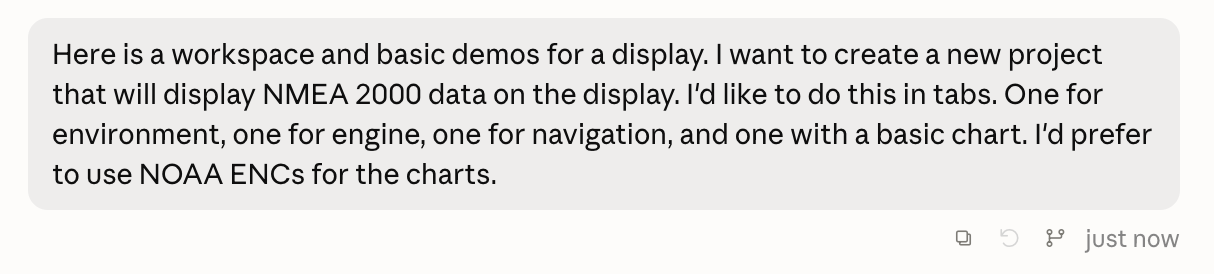

This was a pretty big ask. With basically no discussion, I just asked Claude Code for an NMEA 2000 display to be created. Claude thought and output lots of status messages for about 30 minutes. I used Opus 5 rather than Fable 5, Claude’s most capable model. After waiting for Claude to do its thing, I finally got a message that the project was ready for compilation and uploading.
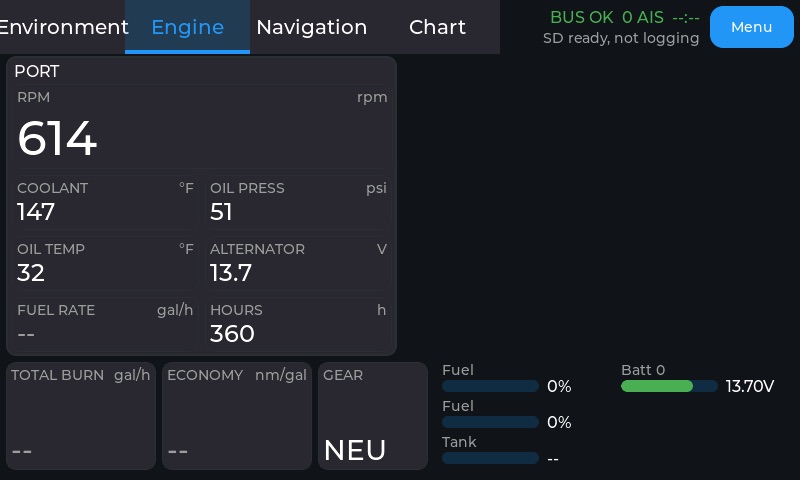
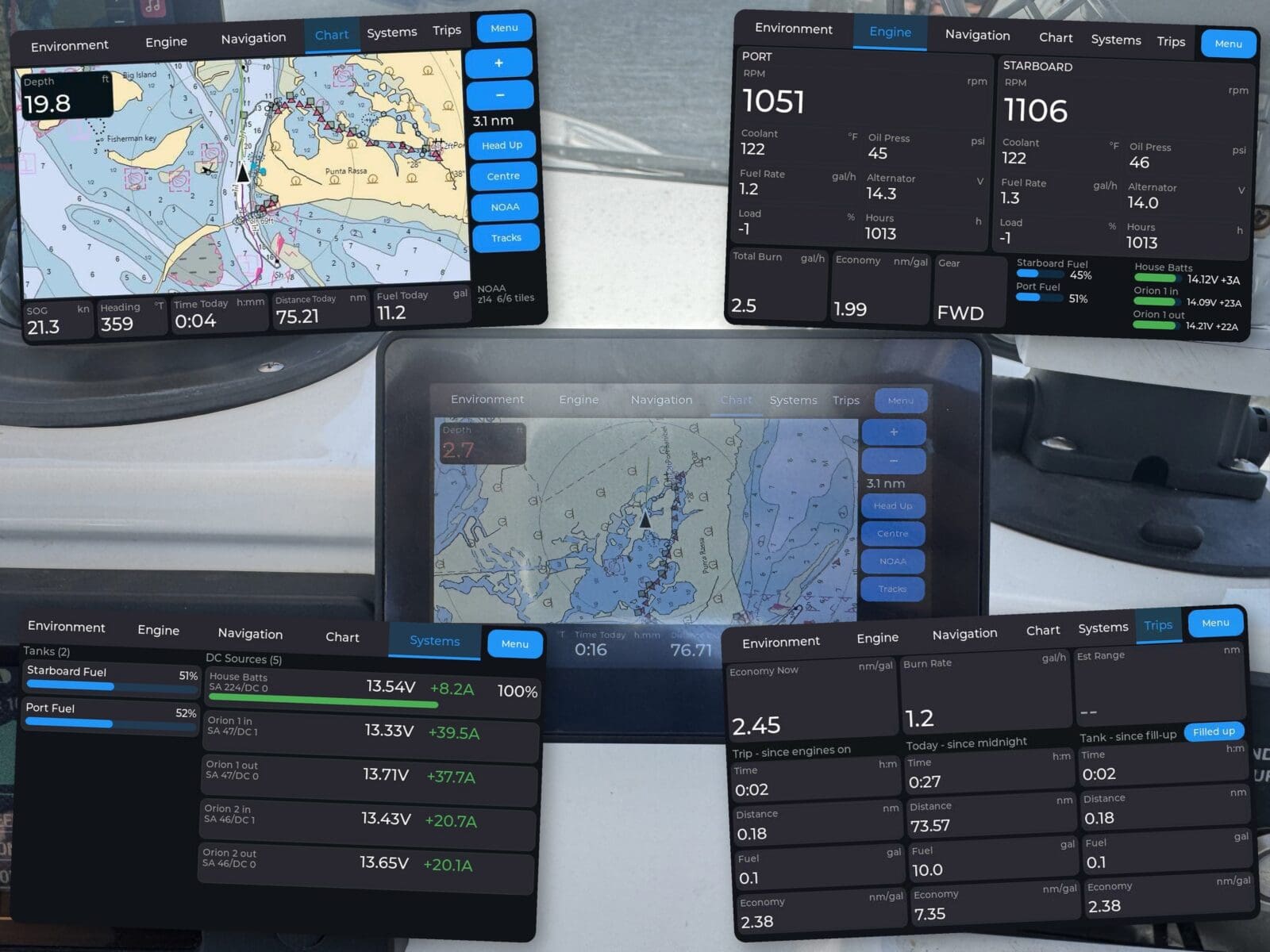
In a truly impressive development, the very first full compile of the application launched on the display and showed NMEA 2000 data. Claude decided not to tackle the ENC display in the first round and I quickly found several bugs in how it displayed data. However, within about four hours of starting my effort, I had good enough functionality to head to the boat and test it on the water. If you look closely at the screenshot above, you will see some issues. The tabs across the top are shifted to the left and slightly cut off, the gear text is truncated, and not all of the functionality is working. Fortunately, easy as this first version was to produce, revisions and improvements are just as easy.
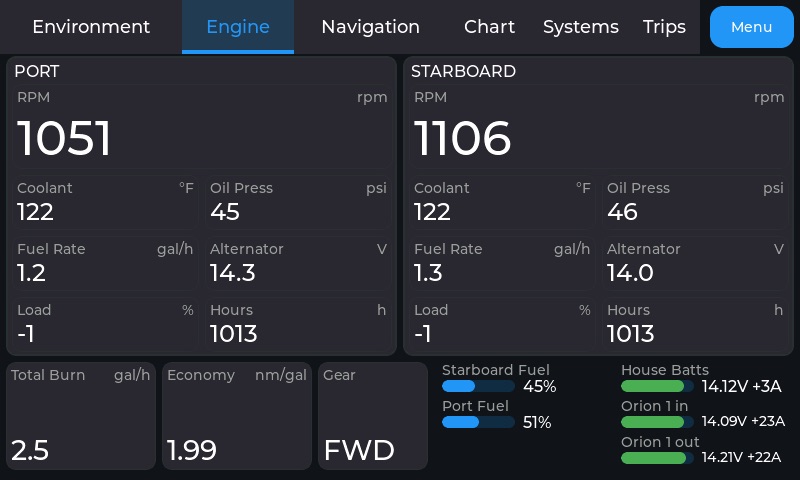
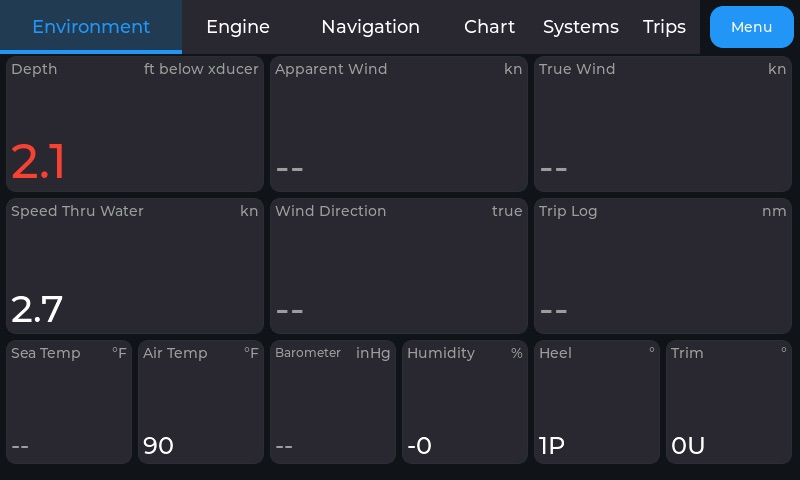
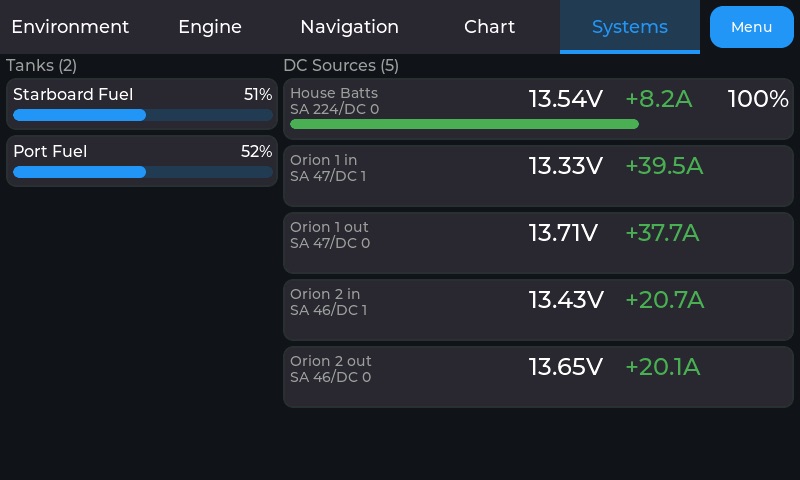
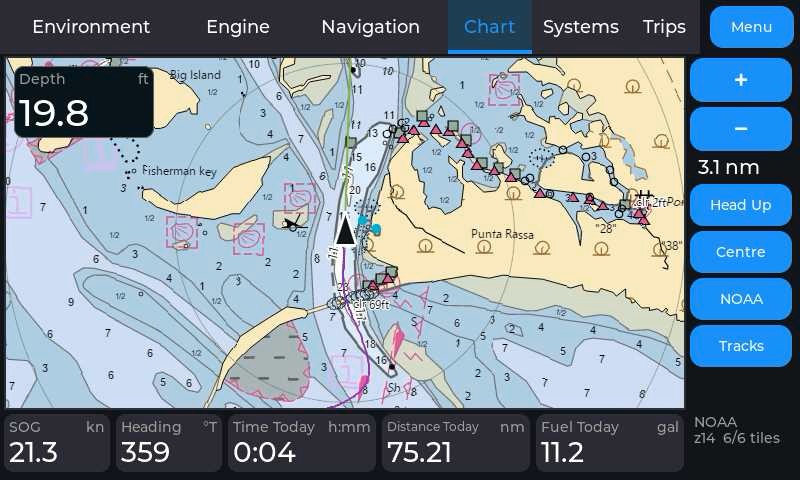
I did my early testing in my lab with NMEA 2000 replays of previous trip recordings. After a couple of hours playing back previous trips and requesting tweaks, I was pretty happy with how everything looked on the display. I now had a fully working display pretty effectively blurring the lines between gauge and MFD. Plus, improved or additional functionality is readily available.
On the water
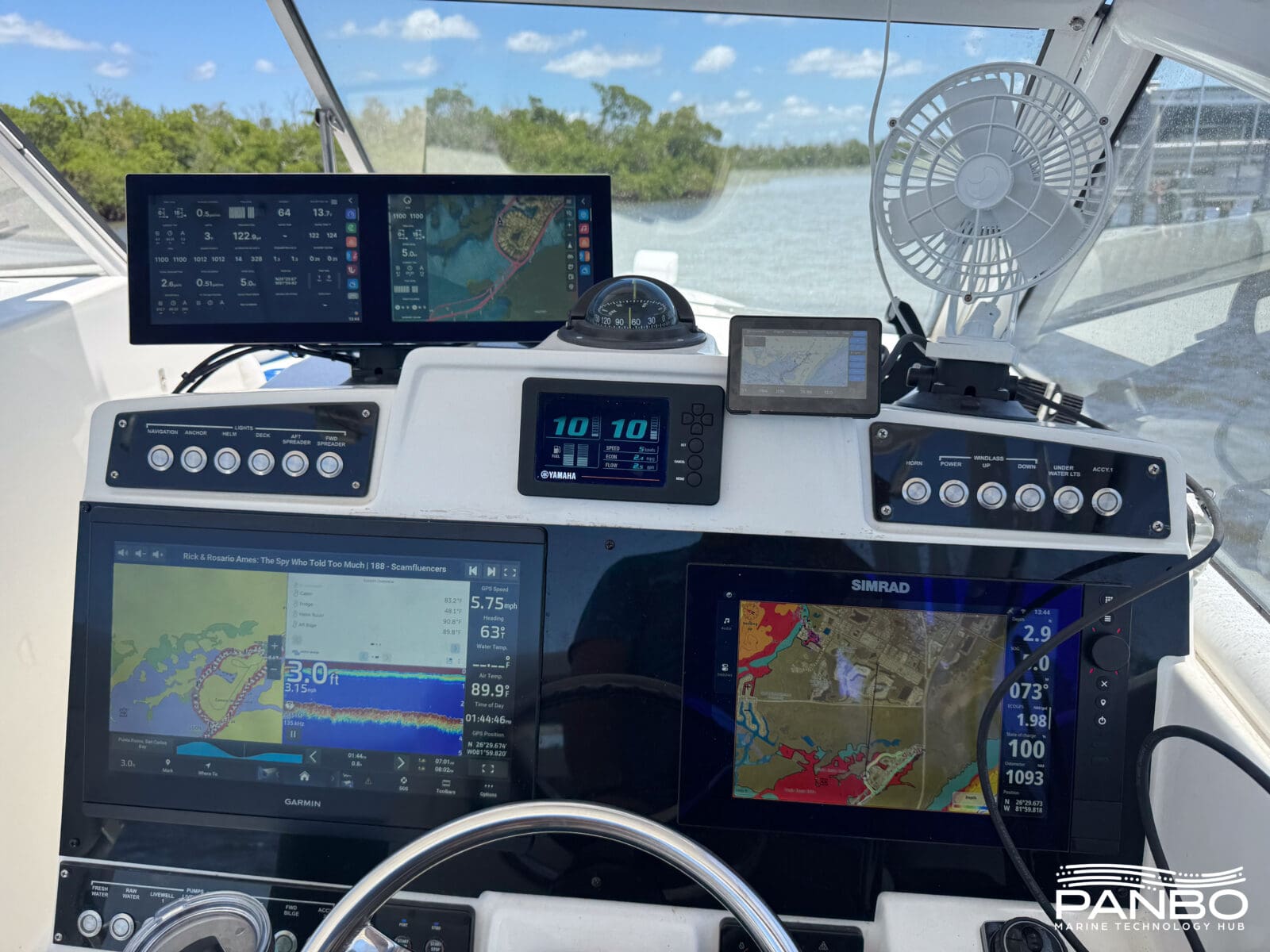
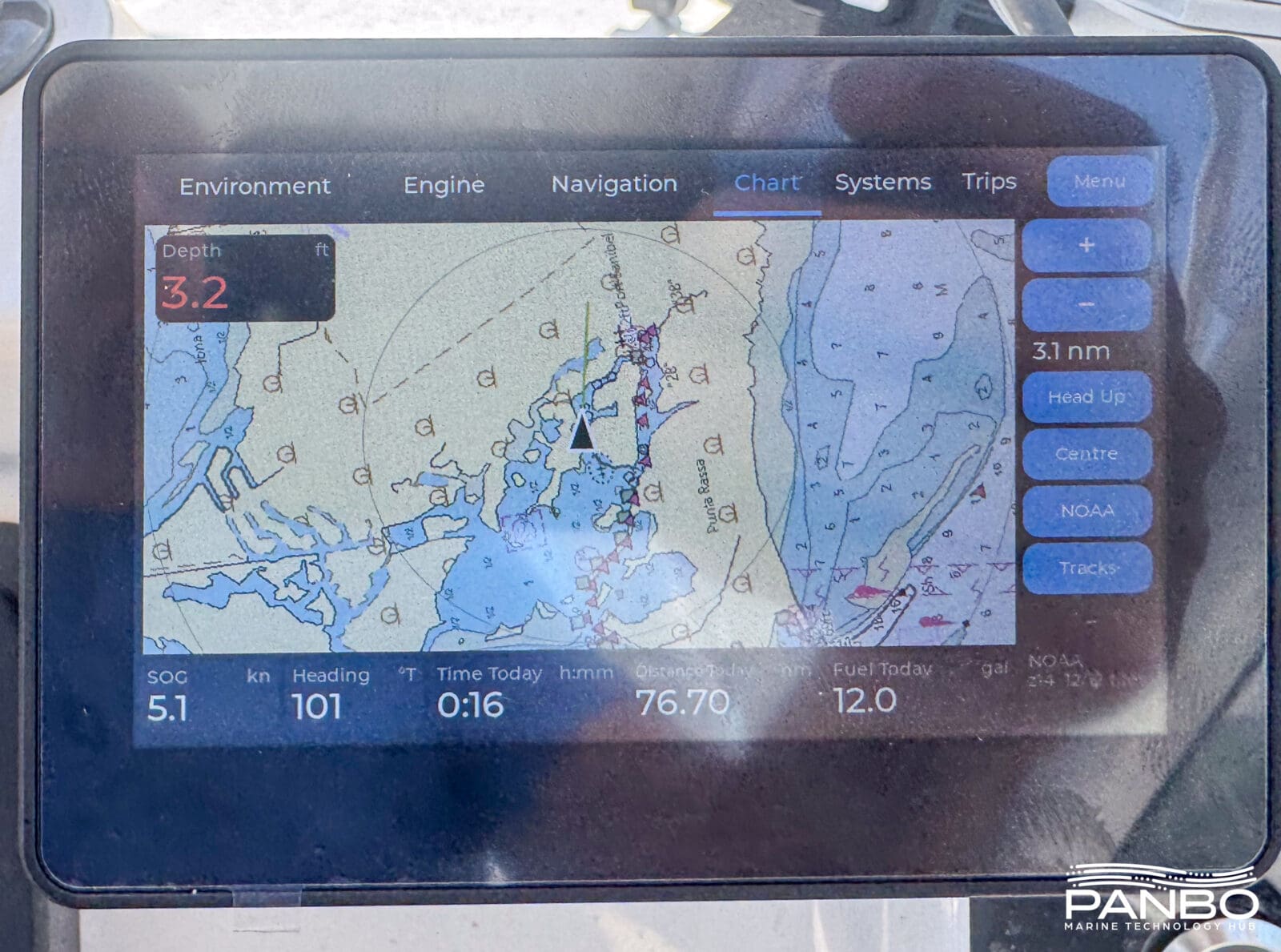
After my development with recorded data, the proof of my little display’s practicality is surely on the water. So, I headed down to Panboat, grabbed a little double-sided tape and affixed the display just to the right of my engine gauge. I was out between about 12:30pm and 2:00pm on a roasting hot Florida afternoon in very full sunlight. Panboat has a hardtop over the helm that surely helps with visibility, but I had no troubles seeing the display despite a less than torch-like brightness rating.
Making changes on the fly
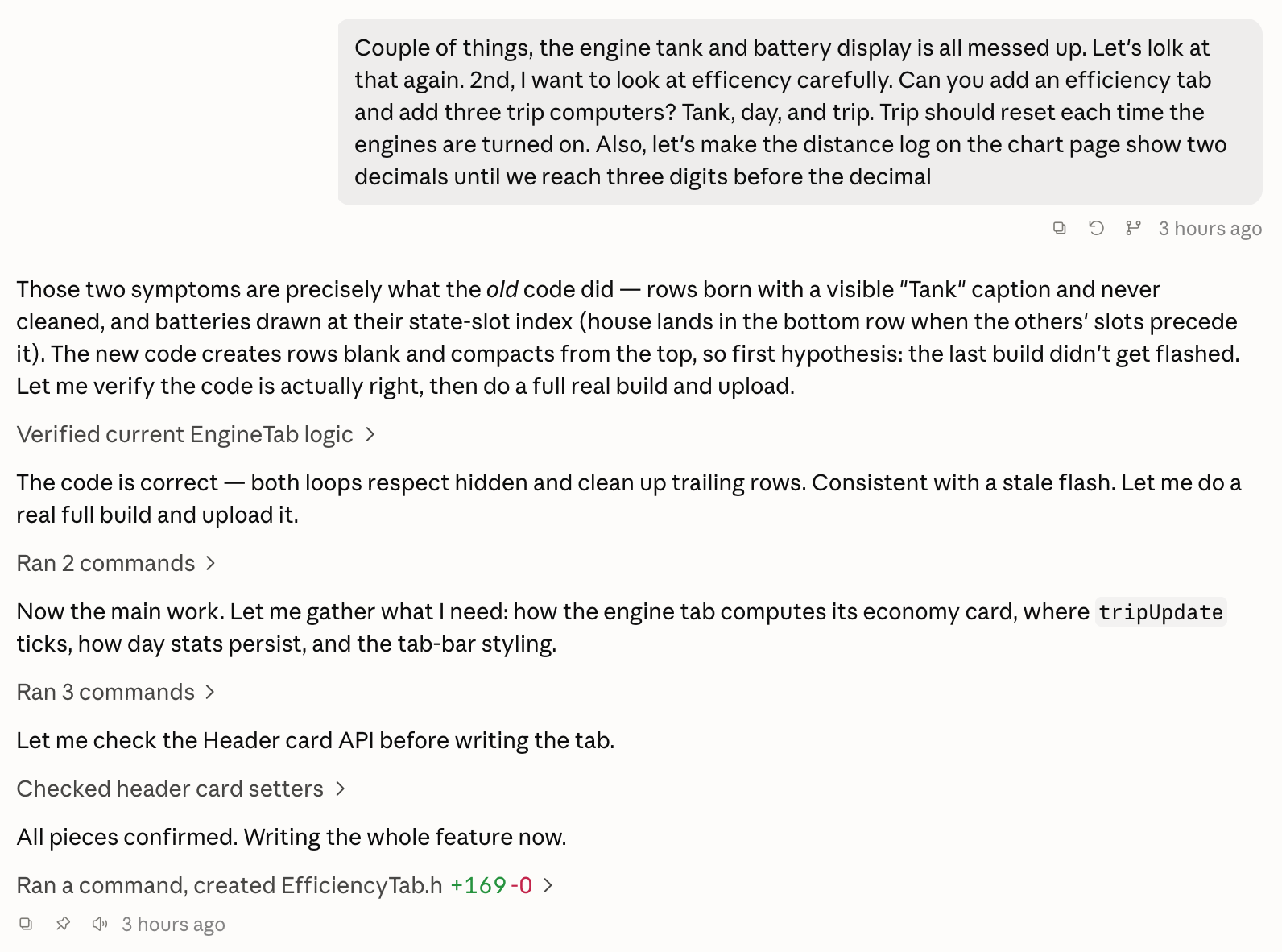
Time on the water revealed a system I like, but I wanted a trip function along with the other tabs. Fortunately, I’d brought my laptop with me and have an internet connection on the boat. So, with the boat in neutral in a safe location, I prompted Claude for more functionality.
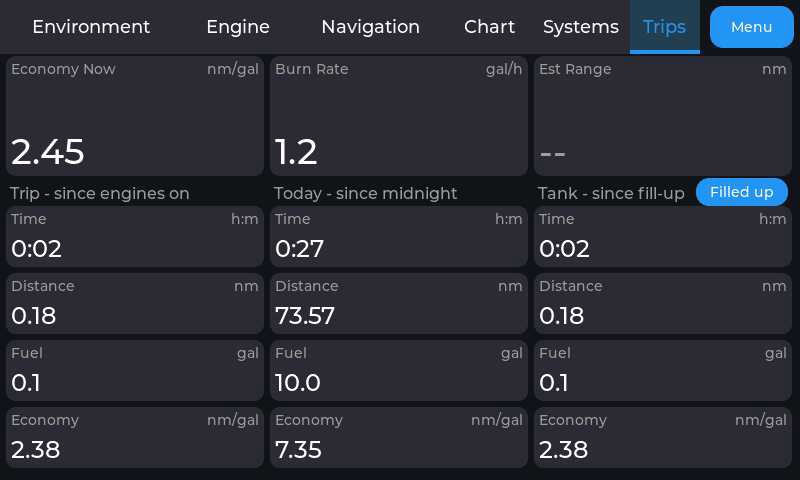
Claude took about five minutes to think about my requests. First, it determined that the complaints I had about batteries and tanks were because I failed to upload the most recent revision to the display. Second, it created the new tab I requested. With the code in place for the new tab, I connected the display to my laptop, compiled the code and uploaded it. Just like that, my display now includes a trips function. There is still work to do. Although Claude implemented an estimated range display, it doesn’t know the size of the fuel tanks. Without that information, the system can’t even guess at range.
The benefits of marinized hardware
A quick glance at the displays visible on the helm shows that the ESP32 just isn’t as bright as the others. The ESP32-S3-Touch-LCD-4.3B I am using has a relatively bright 550 nits IPS display. That’s a significant upgrade over the non-B variant with a 270 nit display. However, compared to the purpose-built marine displays it lags significantly. For example, the Simrad NSS 4 right below the ESP32 is rated at greater than 1,200 nits. As I mentioned, under Panboat’s hardtop, the 550 nits of the ESP32 showed up quite nicely.
Tradeoffs
So far, I’ve mostly covered the advantages and opportunities of a home-brew approach to marine electronics. But, make no mistake, there are downsides too and some of them are pretty big. First, and I think most importantly, this device is communicating on the NMEA 2000 bus. The National Marine Electronics Association (NMEA) has a well defined process for developers to build and certify their NMEA 2000 products. A home-built device like the one I’ve described bypasses the entirety of that process. Most critically, it bypasses the certification process designed to ensure each device on the NMEA 2000 network complies with the standard and doesn’t interfere with the operation of the bus or any devices on it.
I wanted to understand how the NMEA views projects like this as well as the evolving landscape of software development. I reached out to Mark Reedenauer, President and Executive Director of NMEA, for his thoughts. Here is what Mark shared, “NMEA well acknowledges the large DIY installer and DIY developer communities. Many of these individuals have taken our marine electronics installer and developer classes either in person or virtually. NMEA is aware of open source implementations readily available on the web, but we must caution that these implementations and source code should be used only for recreational and personal use cases. If devices that use these open source and publicly available resources become a commercial for sale product, it is expected that the entity comes to NMEA to fully certify the device(s). The same goes for hardware and software alike.”
I also asked Reedenauer how the NMEA is working to bring the DIY community into the NMEA fold and work with them. During my conversation I was pleased to hear that NMEA is actively working to provide opportunities for DIYers. In fact, Reedenauer covered ways the NMEA is embracing individual developers, providing options to spread out the cost of standards, and developing new standards that include a home for the DIY community. Here’s what he said, “Our Cloud Protocol Standard that is in development has already brought in some of the DIY community as there is vast knowledge with cloud protocols and cyber security. In fact several large contributing volunteers on the Cloud Committee work in the DIY and Conservation space. We expect this to grow as NMEA launches the Cloud standard in 2027, with the hopes to motivate independent developers to create applications (Apps) that can be used license free to the boating public.”
My AI developed tool bypassed all of those requirements. It uses manufacturer code 2046 which corresponds to unregistered, but the project hasn’t been tested or certified in any way. In my case, my testing was completed in waters I know very well, on a boat with multiple NMEA 2000 networks. Hence, the downsides aren’t too scary. But, I don’t think I would connect an untested device to my primary navigation network traveling in unfamiliar waters. The idea of asking an AI agent to write the firmware for navigation electronics is very appealing. The idea of heading out to sea with custom developed software written through a collaboration between a machine and a human with potentially zero development skill is… a bit terrifying. So, without getting too preachy, please carefully consider what you are developing and connecting to your boat and how to mitigate risk.
Marinization and broader support
I’ve touched on the fit of general purpose hardware on a boat. Brightness isn’t the only part of the story. The rest of the displays at the helm feature both mounting systems designed for a boat and environmental sealing that make them appropriate for use on a boat. I believe the first time the ESP32 gets a blast of water, either from a wave or a rinse, is likely to be the last. Even at only $50 a piece, replacing the display each time would get old quickly.
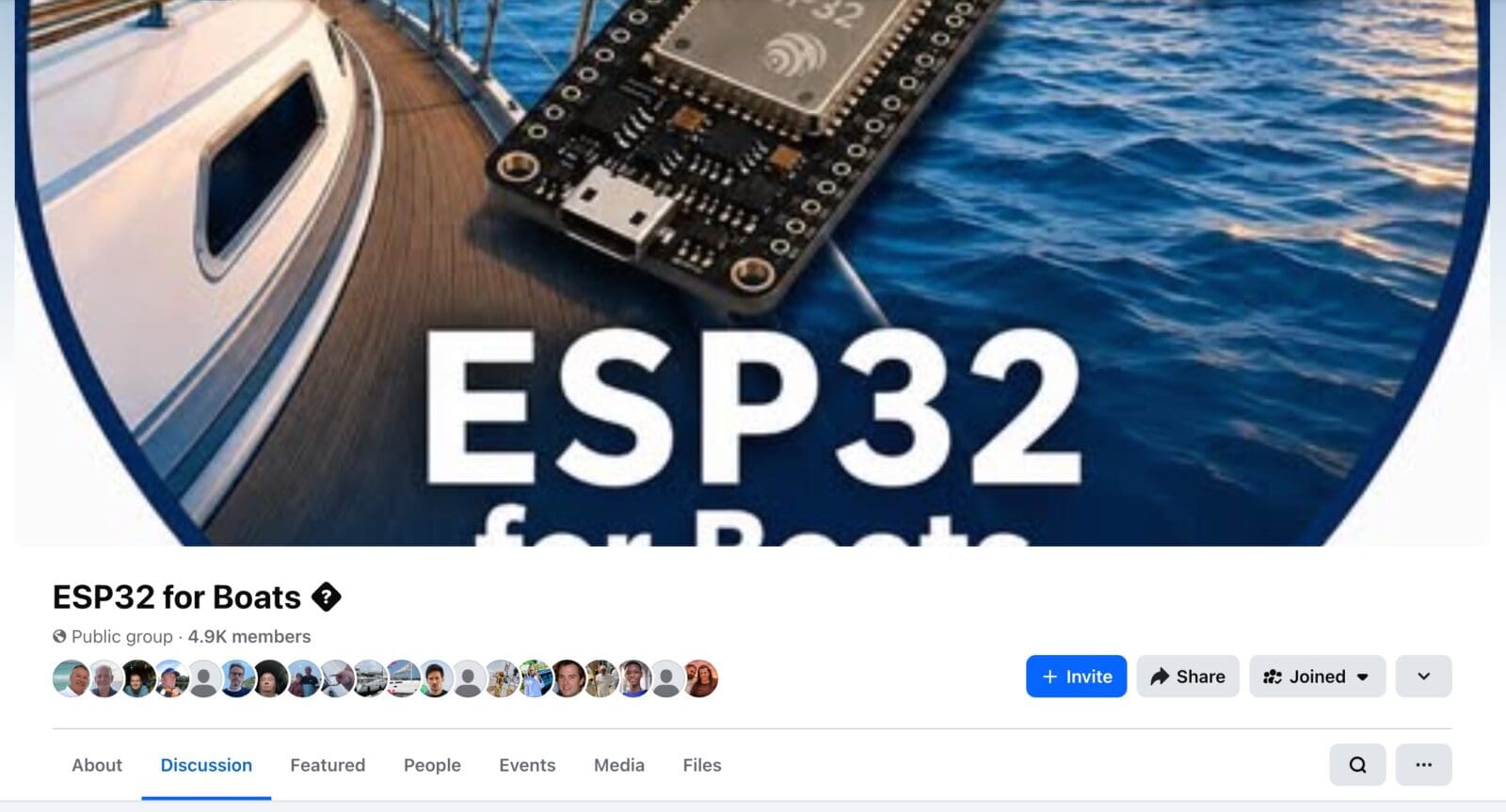
Fortunately for the tinkerers of the world, there is growing momentum for home-built integrations aboard our boats. I have been a member of the Raspberry Pi for Boats Facebook group for years. Recently, ESP32 for Boats popped up and I joined that as well. Both groups provide interesting views of projects in progress.
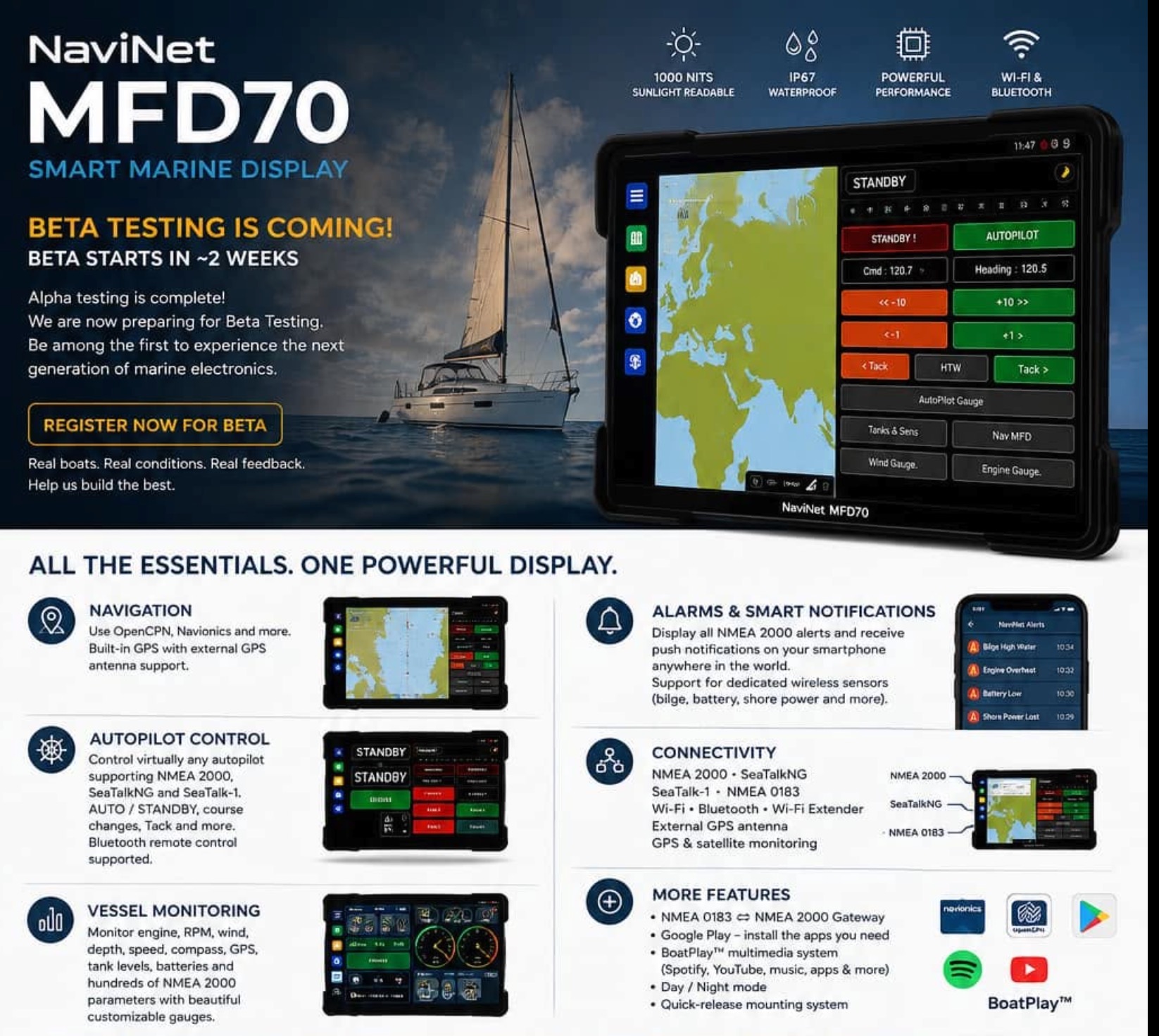
In the time I’ve been following ESP32 for Boats, I noticed consistent contributions from the admin that look a little more polished than most. The admin, Shuki M., is a 73-year-old electronics engineer and lifelong sailor. As he said, “At an age when many people might be thinking about slowing down, I decided to do the opposite and build a new marine technology startup.” That startup is called NaviNet and it produces hardware and software that leverages open source projects to deliver low priced marine electronics. Most recently, NaviNet has started promoting both a tablet based MFD and an ESP32 development board with CAN bus, RS232, and SeaTalk-1.
Although ESP32 development for boats is a relatively small niche, in a recent conversation with Shuki he mentioned that in just over two months since it was established, ESP32 for Boats has gained over 4,000 members. In fact, as I checked today, I see that the group currently has 4,949 members and rising. I might be a geek, but at least I have some good company. If this type of tinkering interests you, the projects shown and discussions on the ESP32 for Boats group is a great view of what’s possible and coming.
Final thoughts
AI impacts everything, everywhere. It has changed the task of software development and made custom software development more accessible. But, this all feels like cliché. With great power comes great responsibility. In this case, I believe that responsibility is to make sure that whatever you do on your boat is safe for you and the boat. To me, that means understanding the application you’ve developed and testing carefully. During that testing, please mitigate your risk. Operate in familiar places, deploy test equipment on separate networks, and plan for a failure.
Alright, I’m done being the wet blanket of safety. I would love to hear from readers about what you’ve done on or off your boat with easier development. This article is all about on-boat electronics, but AI’s rapid coding also opens fascinating opportunities to analyze data. Imagine a racing sailor pulling a day’s data off a voyage recorder and going through every sensor input, every maneuver, and the result. The possibilities are nearly endless. So, let’s hear about your projects and what you’ve built!
Note: A note on the links: some of the product links above are Amazon affiliate links. If you buy something through them, Panbo gets a small cut. Following the links won’t cost you anything extra, and it doesn’t change what I recommend.


I’m a recently retired software engineer, now full time live-aboard cruising the Great Barrier Reef. It’s incredible how quickly you can now build valuable tools with AI’s assistance. I’m working on a few projects: Helmcentral is a dashboard + Alarm system on top of SignalK (https://github.com/gterrill/helmcentral), Helmcam displays the active course and detects obstacles (e.g. other vessels, fishing buoys, whales, mermaids etc) on top of a camera video feed, Helmlocker uses cheap RFID stickers, and a RFID scanner attached to your phone, to manage your spare part inventory and their storage locations. Helmcast is a kiosk display showing temp & wind forecasts (including “nowcasts” for rain prediction). I’m having so much fun building these projects! Planing on open sourcing all of them eventually.
Great article, will second what Gavin said above, so much fun and very addictive. I had been developing an Open Source Alternator Regulator (https://github.com/markliquid1/Regulator2026-public and http://www.xengineering.net ) for 3 years, and the last 6 months since ClaudeCode ramped up have sped up progress by a factor of about 50, and allowed me to actually finish about a week ago. Happy to see all the interest these types of projects are getting.
Ben, and Gavin since you are here already, this is the part I keep coming back to. Between the two of you the display and the alarm are close to free now. What that does is move the expensive part somewhere else, and oil pressure is the clearest example I know of where it went.
An alarm still needs somebody to choose the number. Ben, look at your own Engine tab. Oil pressure is sitting there as a number, and it is the same number a $400 gauge shows. On almost every marine diesel that number has a warning light behind it, and that light is a switch, not a gauge. It closes at 0.3 to 0.5 bar, and it closes at that same pressure at any rpm, any oil temperature, any load. So it is not telling you the pressure is fine. It is telling you it has not failed yet. That is what a fixed threshold buys you, and it is why we stopped trying to pick a better one.
At cruise on our own boat the difference between those two instruments is three and a half bar. That is pressure an engine can quietly lose over a season with the panel dark and the engine sounding exactly as it always has.
Disclosure, I work at Galvanic Works. We read the same four channels off the bus that you are already displaying. The device learns what that particular engine is normally like across its own hours, then watches for departure from it. The comparison is the engine against itself through the same sender it always used, so if that sender reads a few per cent low, it read low when the baseline was learned and it reads low today, and the error cancels. We are not asking the sender what the pressure is. We are asking whether anything has moved.
It speaks 8× earlier than the engine’s own switch. The trend detects a change 378× smaller after seventeen minutes of running, 2,014× smaller after a day’s passage, and 7,120× after a hundred hours, because the longer it runs the finer the comparison gets.
What it cannot do, because that matters more: it cannot tell a failing sender from a failing pump, only that something moved. It cannot see oil level, so the dipstick stays. And it cannot yet turn a decline into a number of months.
On your sealing point, you are right that it is what bites, and a speaker is the worst case for it. A speaker normally needs a hole, a grille or a membrane, and a membrane is a part that ages. Ours does not have one. The acoustic surface is the sealed glass that also carries the LED ring, so there is nothing to perforate and nothing to perish. The unit is IP67 and IK08 rated, and it can sit in a spray zone and be washed down.
The working out is published, including the raw numbers off a Volvo Penta D3-110 at 2,098 hours and 543,755 engine records from a week of real cruising: https://galvanicworks.com/engines-oil-and-conspiracies/
Oil pressure is just the example I happened to bring. The anchor watch is catenary geometry, the polars are empirical distributions built from your own boat rather than a designer’s curve, and the fatigue model is biomathematical, built on published sleep research. None of that is a display problem, and none of it is AI either. The only neural network in our box is the one that turns an already decided sentence into speech. What to say, and when, is physics.
“Biomathematical fatigue models” make for great marketing copy, but dynamic anomaly detection on N2K PGNs isn’t rocket science. It’s no longer something that requires a proprietary solution when open-source stacks can do the exact same math transparently.
Agreed, proprietary software that’s as simple as this is in its dying days.
It seems the link to NaviNet doesn’t work! I’m certainly lookingfo a better tablet that has better daylight visibility. Most boats have limited crew and the ability to monitor safe navigation for the helms person is important. The black and white tablet screen is good, but way too pricey!
No argument on the maths, Gavin. It is not exotic, I am not going to pretend it is, and the essay shows the working rather than describing it, the boat, the engine, the hours on it and how many records it is built from, so it can be checked and picked apart instead of taken on trust.
But both halves of your sentence come apart in the same place. The maths is the cheap half. The expensive half is the thing you feed it.
Take the fatigue side, since that is the one you called marketing copy. The word is the field’s, not ours. The engine is the two-state model of McCauley, Kalachev, Smith, Belenky, Dinges and Van Dongen, Journal of Theoretical Biology 256(2), 2009, with the parameter set from Ramakrishnan and colleagues, and the work of carrying that into sailing is published too, two preprints with our own names on them, DOIs 10.20944/preprints202603.1014.v2 and 10.20944/preprints202604.1649.v2. They are ours rather than anybody’s independent verification of us. Read them, implement them, I would rather you did.
What you cannot pull off a shelf is the signal underneath, and there are two of them. The first is the person. We measure each one continuously, on the wrist, and the unit classifies each wearer asleep or awake in real time. Every consumer sleep algorithm ever written assumes that if the wrist moved, the wearer moved it. On a boat that is simply false. A wrist lying dead still on a bunk in a Force 5 is moving constantly in the accelerometer’s own frame, so a land algorithm calls a profoundly asleep person awake all night, every night, and any fatigue figure built on top of that is meaningless at exactly the moment somebody wanted it.
The second is the boat. Rest taken in violent motion is not worth the same as rest taken at anchor, so the motion reading reduces the recovery credited for a given period of sleep. Note what that is not: it is not a forecast and it is not the sea state. The model never asks how big the waves were, it asks how hard it was to rest, which is a property of this hull as the bodies aboard it actually experience it. Two boats half a mile apart in the same water legitimately report different numbers, and neither of them is wrong. That is not a feed you can subscribe to.
What comes out the other end is a blood alcohol equivalent, because that is a unit sailors already have a feel for. Seventeen hours awake is about 0.05 percent, which is the drink driving limit in most countries. We are shortly putting that fatigue side out as a free calculator app of its own, the Galvanic Fatigue Calculator, no boat and no hardware needed.
Oil pressure is the same problem wearing different clothes. The detection is not the work, the number you compare against is, and you will have met this on the alarm side of Helmcentral. What does your oil pressure read at cruising revs? And what would you need to know to say whether that figure is normal for your engine, rather than just comfortably above the switch?
Ouch, AI to write code is one thing but using it for answers that we poor humans then have to read?
fair it was too long …
Ben you write:
> I also asked Reedenauer how the NMEA is working to bring the DIY community into the NMEA fold and work with them. During my conversation I was pleased to hear that NMEA is actively working to provide opportunities for DIYers. In fact, Reedenauer covered ways the NMEA is embracing individual developers, providing options to spread out the cost of standards, and developing new standards that include a home for the DIY community. Here’s what he said, “Our Cloud Protocol Standard that is in development has already brought in some of the DIY community as there is vast knowledge with cloud protocols and cyber security. In fact several large contributing volunteers on the Cloud Committee work in the DIY and Conservation space. We expect this to grow as NMEA launches the Cloud standard in 2027, with the hopes to motivate independent developers to create applications (Apps) that can be used license free to the boating public.”
I’d really like to know who this is… AFAIK the Signal K community hasn’t been involved.
I would also love to know more about this. I’ve reached out to NMEA several times about the DIY community and have had very little traction. I’m glad they’re considering the DIY community, but it would be great if key groups like Signal K and others were included since that is a huge slice of that community.
Kees and Steve,
I’ve reached out to Mark Reedenauer from NMEA and let him know about both of your concerns.
-Ben S.
Thanks Ben!
Ben, Kees, Steve,
I’m helping lead NMEA’s Cloud initiative and would love to talk about what we’re thinking and how it can integrate with community efforts.
—
Jeremy
co-Chair, NMEA Cloud Committee
I’ve been using Claude Code to build a custom control app for my ham radio. I have rudimentary coding skills, but I’d never be able to pull off what Claude has created. I hadn’t even considered boat apps, I’m excited at the possibilities.
Any reason one of these boxes couldn’t be loaded with Venus OS and be a much cheaper Elkrano?
Unless Victron produces a version of Venus OS that is designed to run on this hardware, it won’t work. The versions they produce for DIY hardware is work on Raspberry Pis which have a very different processor family and hardware design.
-Ben S.
I’ve created a few of my own apps / solutions for things like detailed anchor rode calculations, weather analysis, and passage planning, all very easily with Claude and other AI tools. I think it’s a fantastic set of tools and am happy to finally see barriers removed that allow more people to create great ideas and solutions. I’ve seen so many of them in the last year, and many have inspired me to change or review existing tools or apps that I use every day.
However, I’ve also seen many of these apps and tools have egregious bugs in them. Incorrect data conversions for depth, assumptions about GPS coordinates and reliability, and more. And then you step into the maintenance and supportability aspect of things. Some folks create a tool that works perfectly for them, but don’t prompt their AI to document or be consistent with languages or approaches. Figuring out how it was created can be a bigger time suck than just starting over. And many of these projects are created and delivered by one person, which is fine, but if they’re out cruising on the water, or their day job is taking up too much of their time, you’re stuck waiting, or worse, the project is abandoned.
I think the tools we now have are amazing and will force bigger manufacturers to really think about how they can take advantage of it. It won’t happen quick, nothing seems to in the marine industry, but failure to at least embrace some part of it will result in DIY filling the gap and I would imagine, in a few years, in a meaningful way that hurts the bottom line. Only time will tell….
“Figuring out how it was created can be a bigger time suck than just starting over.”
Yes there’s a bar for “slop the developer thinks is great” vs. “free starting point that doesn’t suck and can be built upon at a time savings”. Easy to tell one from the other once you’ve gotten used to looking at AI all day. The adage that it’s now easy to get to a 90% solution in 1 prompt, but then becomes increasingly inefficient to polish to perfection vs. hand coding seems very accurate.
There is one point in the NMEA/open-source section that I think may be worth highlighting or clarifying for readers.
The widely used NMEA2000 library developed by Timo Lappalainen is released under the MIT License. Importantly, the MIT License explicitly permits commercial use, modification, distribution, and sale of software incorporating the library, subject of course to retaining the required copyright and license notices.
This is not merely theoretical. There are already many commercial marine products built around open-source software and open-source marine projects, including products interfacing directly with NMEA 2000.
Examples we have encountered include:
• Commercial ESP32/Arduino-based NMEA 2000 gateways, displays and sensor interfaces using Timo Lappalainen’s NMEA2000 library.
• NaviTop pypilot controllers and computers, commercially sold hardware based around Sean D’Epagnier’s open-source pypilot project.
• MacArthur HAT, an open-hardware marine interface designed for Raspberry Pi and extensively used with OpenPlotter and Signal K.
• Numerous commercial and DIY marine gateways built around Signal K, which itself has a large open-source ecosystem.
• Commercial hardware platforms designed specifically to run or integrate with OpenCPN, OpenPlotter and pypilot.
Our own NaviNet MarineCore™, E2K, NAP70 and related development hardware follow the same general philosophy: commercial marine hardware can legitimately make use of open-source components while respecting the licenses of those components.
So I think it is important not to confuse “open source” with “non-commercial.” They are not the same thing.
An MIT-licensed library is specifically intended to allow very broad reuse, including in proprietary and commercial products. What matters is complying with the actual terms of the license — not whether the resulting hardware is sold commercially.
Seems a good point, the wording was “If devices that use these open source and publicly available resources become a commercial for sale product, it is expected that the entity comes to NMEA to fully certify the device(s). The same goes for hardware and software alike.” “It is expected” seems different than what’s legal, but would be interesting to hear from anyone who reads it differently.
It is also worth noting that NMEA certification is not, by itself, a regulatory approval mandated by U.S. federal regulators. In the European Union, the regulatory framework also recognizes and accommodates open-source software, rather than making commercial use of open-source code dependent on certification by a private industry association such as NMEA.
Excellent article. I think this is just the very tip of the iceberg. It will be interesting to see the progression.
Great article, Ben. What struck me most wasn’t that you built a $50 NMEA 2000 display in four hours, impressive as that is. It was where you went at the end of the article.
The cost and effort required to collect and display information is collapsing. AI and hardware like ESP32 are making it possible to build things that would have been impractical for most people only a few years ago.
Your comment about the opportunities to analyze all that data is where it gets particularly interesting to me.
What happens when all these new sensors, displays and applications stop being isolated pieces and their information becomes part of the broader operational context of the boat?
A temperature reading is useful. That same reading alongside engine state, electrical load, weather and the historical behaviour of that particular boat can potentially tell us considerably more.
I think we’re going to see an explosion in the amount of information we can collect from our boats. What we can understand from all of it may turn out to be the really interesting part.
It’s also been far too long since we’ve talked. Zora has changed enormously since then and, knowing you have been following what we’re doing, I think it’s probably time we finally gave you a proper look at it. If you’re interested, Olivier and I would love to give you a technical demo and hear what you think.
The innovation now happening in the space is brilliant and the swell of open-source being created is even better. Putting others open-source on hardware you sell without contributing back to it (yes I checked the commit history of the projects references) really is not, its parasitic. If you want to bundle others open-source, even when permissive licenses are involved, you should also morally open-core meaningful parts of your own work if thats the business model you believe in so I assume you will be doing that as well?
Ben, this is a useful reminder that cheap displays are now easy. The harder question is what sits behind
them.
Signal K has done a lot for experimentation and integration, but I would not make it the core of a boat
system. A general JSON/event model plus a broad JavaScript plugin ecosystem is convenient, but it is a weak
boundary for the part of the system that normalises, authorises and serves all onboard data.
I think the better shape is a Jetson-class hub running a small Rust core, with simple displays as clients.
Jetson is there for local perception and sensor fusion, not just to make a fancy dashboard. Rust is a good
fit because the ingest, data bus, chart engine and capability boundaries can live in one predictable,
offline-first system.
Two projects make the chart side far more interesting. The IHO’s S-101 work at https://github.com/iho-ohi
provides the modern portrayal rules and symbols. https://github.com/beetlebugorg/tile57 shows that current
S-57 charts can be adapted to that model and rendered from those rules. That is a big deal: complete chart
portrayal no longer has to mean proprietary software.
I have also completed a security review of Signal K and its plugin ecosystem. I will publish it responsibly,
with enough detail to reproduce and fix the problems, but the number of ways a compromised plugin or
network-facing component can become a route into a boat system is sobering.
One final point: NaviNet is a good reminder that using open source and being open source are different
things. It is fine to build on open source. But attribution, licence compliance and giving something back
should be part of the deal.
And yes written with Claude code pointed at my code repos. Will get my worry arse in gear and finish my site, some prototypes, an NMEA simulator, marine security scanner and the first rev of the hub… soon. Well soonish! Hats off to helmstation and tile-57 and of course SignalK may not be my cuppa tea but hats off for amazing work and a great project !
Oh yeah and on hardware, iPad Pro has 1000 nits in sunlit, peak of 1600 for HDR content and the nano screen for anti-reflection. As above my take is for an expensive boat cheap hardware is not the right route, others opinions of course vary and valid but for me thats my current screen target along with Orca display. One issue with Apple distribution via the store is no GPL.
Since NaviNet was mentioned directly by Mark Curphey, and the comment posted under the name Linus Torvalds raises a similar point, I would like to clarify how NaviNet actually uses and contributes to open source.
NaviNet uses open-source software primarily for established protocol libraries and projects such as pypilot. We do not modify these projects and then close or repackage their source code as our own. Our own development is built around them, through separate hardware, interfaces, applications and integration layers.
We respect the licences applicable to the open-source components we use and provide the required attribution and credit to their developers.
But I think the suggestion that NaviNet simply takes from open source without giving anything back is not an accurate picture.
Even where the applicable licence does not require us to publish our independently developed code, NaviNet actively contributes back to the marine DIY community.
We have released applications, tools and code for free, including Anchor Watch, Node Monitor and NMEA simulators, as well as other development resources. We also make dedicated marine hardware available at reasonable prices specifically to enable DIY builders to turn these ideas into reliable systems suitable for use aboard boats.
Today this work covers approximately 21 different DIY marine projects.
For us, contributing to open source is not measured only by the number of commits made to somebody else’s repository. Documentation, testing, applications, tools, affordable hardware, technical support and sharing working designs with other builders are also meaningful contributions to an open ecosystem.
Anyone interested is very welcome to join us in the ESP32 for Boats Facebook group, see what is being developed and shared, and participate themselves.
Constructive criticism of commercial projects using open source is entirely legitimate. But I think it should also recognize the difference between using open source in accordance with its licence, taking proprietary ownership of somebody else’s work, and building independent products around open-source components while continuing to contribute tools and resources back to the community.
Those are not the same thing.
Can you share your Github org? I just tried looking for it but couldn’t find it. I am sure thats me but …
Mark, you didn’t miss it — NaviNet does not currently maintain a GitHub organization.
Maintaining public repositories properly requires time and resources that, at this stage, I prefer to invest in development, testing, documentation and supporting the marine DIY community directly.
That does not mean we don’t share our work. We regularly share code, applications and tools through the ESP32 for Boats Facebook group, and when someone requests source code or an application, I am happy to send it directly by email.
This includes tools such as Anchor Watch, Node Monitor, NMEA simulators, and code and resources related to our DIY marine projects.
GitHub is an excellent way to contribute and share, but it is not the only way to do so. Perhaps in the future, as resources allow, we will organize these projects into public repositories.
In the meantime, if there is a particular project or piece of code you would like to see, just ask — I will be happy to share it with you.
I am sorry and I am not the type of person to usually do this in public but your claude response is just AI slop / fluff and kinda got my goat so I’ll call you on your response “In the meantime, if there is a particular project or piece of code you would like to see, just ask — I will be happy to share it with you. ” so yeah please share the code for Anchor Watch, Node Monitor, NMEA simulators, and code and resources related to our DIY marine projects. You said you would!
FWIW I have spent hundreds of thousands of dollars stopping hard working OSS maintainers be abused by people making money from them so its a bug bear for me https://crashoverride.com/blog/welcome-zap-to-the-open-source-fellowship – sounds like you aren’t those people so looking forward to you sharing all your code like you say above.
Fair enough, Mark. You asked, and I said I would share it.
You are welcome to access everything that we currently share with the ESP32 for Boats community. I would actually encourage you to join the Facebook group and look through the project overviews first — it will give you a much better picture of what we develop, what we share freely, and what the community is building around it.
Here is one example: our Anchor Watch application, available free to the community:
https://www.facebook.com/share/p/1Ebf7VPscy/?mibextid=K35XfP
For source code that we distribute directly rather than through a public repository, simply email your request to [email protected]. That includes Anchor Watch, Node Monitor, NMEA simulators, and the other DIY code and resources that we make available to the community.
Just to avoid creating a new misunderstanding: when I say that we share code, I mean the projects and resources that NaviNet has chosen to make freely available — not that every piece of independently developed NaviNet commercial source code is open source.
I also think we are beginning to take Ben’s comments section rather far from the subject of his original article. The ESP32 for Boats Facebook group would probably be a more appropriate place to continue this discussion, and I would genuinely welcome you there. You can see the projects for yourself, ask questions, challenge what we are doing, and discuss it directly with the community.
I hope you’re happier now, Mark. And if not, you’re very welcome to keep challenging NaviNet — preferably over in ESP32 for Boats. Good challenges keep us sharp. 🙂
Mark, regarding the “AI slop” comment: yes, I use AI tools to help me write in English, which is not my native language, just as I use AI extensively as a development tool. I have never tried to hide that.
But AI helping me express something in English does not make the facts, the projects or the commitments behind the words any less real. I stand behind what I wrote, and I am personally responsible for it.
So rather than debating whether Claude helped with the wording, let’s deal with the substance. You challenged me to deliver on what I said. Fair enough — you asked, and I said I would share it.
Mark, you mentioned that you have spent hundreds of thousands of dollars helping prevent hardworking open-source maintainers from being exploited by people making money from their work.
That genuinely interests me, and I think it could also be valuable to others following this discussion.
Would you be willing to share a little more about what you have actually done in this area — the projects or maintainers you supported, what the funding was used for, and what results came from it?
If there are public articles, reports, projects or other references describing these activities, please share the links as well.
You have raised an important question about what companies should give back when they benefit from open source. Your own experience of putting substantial resources behind that principle could therefore add something useful and concrete to this discussion.
I have explained what NaviNet does and what we contribute. I would be genuinely interested to learn more about what you have done as well.
Seriously? Read the blog (or have Claude read it). Do some googling (I created owasp.org). Publish your code on Github if you are bundling others, its simple. I am not signing up to your mailing list or your facebook page. I am also not wasting anymore time on responding to you online but you are in my cross-hairs. I have been here before and you check all the boxes.
Seriously? Read the blog (or have Claude read it). Do some googling (I created owasp.org). Publish your code on Github if you are bundling others, its simple. I am not signing up to your mailing list or your facebook page. I am also not wasting anymore time on responding to you online but you are in my cross-hairs. I have been here before and you check all the boxes.
Mark,
Your involvement in open source does not give you the authority to define your personal view of open source as a rule that everyone else must follow.
Where NaviNet chooses to publish its own freely shared projects — whether through GitHub, a Facebook community, our website, or directly to users who request them — is NaviNet’s decision.
GitHub is an excellent platform, but it is not a requirement simply because someone like you believes that it should be.
More importantly, your last response crossed the line of a respectful and professional technical discussion.
Remarks such as “have Claude read it,” “you are in my cross-hairs,” and “you check all the boxes” are neither respectful nor constructive. They turn what could have been a legitimate discussion about open source into personal insinuation and intimidation.
You are free to hold strong opinions about how other people should participate in open source. You are not in a position to dictate to me where I must publish NaviNet’s freely shared work.
I entered this discussion willing to explain what we do, answer questions and even offered you direct access to the projects we share. Your response to that offer was to dismiss it, demand that I use the platform of your choosing, and then tell me that NaviNet is “in your cross-hairs.”
That is not a professional way to conduct a technical discussion, and I have no interest in continuing on those terms.
We clearly disagree, and that is perfectly acceptable.
What is not acceptable to me is the tone this exchange has now taken.
Therefore, this is my final response to you on this subject. I will not continue this discussion with you.
Ben, I hope my comment doesn’t get lost in the lively off-topic discussion above….
Your article was exceptionally interesting. I almost followed most of it — and think if I tried I could mostly replicate your work. But the interface part is missing, I think.
How do you connect your N2K network to your ESP32? You never discussed that with Claude, so somehow Claude made valid assumptions. Almost no N2K -> Bluetooth/wifi converters stay in N2K (most are 0183). I have an N2K network on my boat, and would love to create something rather close to this — but how to get N2K in/out of the ESP is a challenge.
Can you share a few words on how you connected the ESP32 to N2K?
BTW, I’m going to join the ESP32 page. I made an ESP32 fog horn controller that I’m trying in vain to share with zero takers. I tend to sail where it matters.
Harry,
Thanks for the question. I apologize that I didn’t make this clear in the initial article. The board I selected has a CAN transceiver built in, not just the ESP32’s TWAI controller pins as is common on many ESP32s. With the full CAN transceiver present, there are CAN-Hi and CAN-Lo connections on the board. I then cut the female end off a NMEA 2000 cable and connected CAN-Hi (white) and CAN-Lo (blue) from the cable to the CAN-Hi and Lo terminals on the ESP32. Additionally, the board I’m using has a 12v powering option, so I’m using power from the NMEA 2000 network to power the ESP32. I must admit (as this isn’t a production product) I haven’t done the power consumption math to determine a LEN equivalence, but there’s a good chance I’m drawing too much power from the NMEA 2000 network. Were this to be a non-test product, I would likely deal with isolation between the CAN interface and the rest of the ESP32. But, for my testing purposes, I have not.
-Ben S.
That does not mean we don’t share our work. We regularly share code, applications and tools through the ESP32 for Boats Facebook group, and when someone requests source code or an application, I am happy to send it directly by email.
This includes tools such as Anchor Watch, Node Monitor, NMEA simulators, and code and resources related to our DIY marine projects.
GitHub is an excellent way to contribute and share, but it is not the only way to do so. Perhaps in the future, as resources allow, we will organize these projects into public repositories.
Great. I’ll send you the email request for the code for Anchor Watch, Node Monitor and you NMEA simulators. Given all open-source licenses mean its ‘open’ by nature I’ll put it online for you and the community in Github so you won’t be constrained by your resources as you say. Thats what open-source is all about after all.
All,
I appreciate the work passion involved and the work done advocating for the open source community. That said, at this point, this seems to be a personal disagreement based on assumptions and concerns over the how. This isn’t the forum to solve those disagreements. Each of you has now said their piece. As Harry rightly notes, we’re getting very far afield from the topic of this article. Please limit further conversation to those topics that concern the ideas covered by the article.
-Ben S.
Is it possible to put Mark on ignore? As often happens in the open source world, he has let his argument lose sight of the subject of this thread — AI development of a $50 N2K display.
I’ll not post Harry, all good
AI is changing the whole approach to building anything, not just marine instruments. Its worth looking at the Article by Dave Plumber about Vibe coding a task manager, the important part was, he was going to Vibe code a Word replacement, but he only had a few hours whilst he was waiting for his son in hospital. Code is becoming disposable.
You may have missed the mark on the uses of these instruments. I have made a replacement for my B&G Triton 2, whilst I can 3d print a housing for it in the wheelhouse, it actually sits in my cabin as a quick reference for windspeed and heading and a low power anchor watch. I have another beside the chart table, with everything I need at a glance to write the log. The ESP32 display cost £15 and a few days vibe coding, using the WIFI NMEA data (which is much easier that CAN)
I’m not going to spend £500 on a 4.3″MFD for a casual display, I might pay that for an outside instrument, that is properly weather-sealed with a warranty .But then I can have a dozen spares of these displays in a box and have change for a paddle-board! (it might also be fun to 3d print a proper housing for it!)
Awesomeness Ben !! Great article and long overdue !!!! Thank you for doing this so relative with claude today !
John Neyland Jr. here. Hello Ben!!
Perhaps this is the time to make my Pilot Line Systems Software Defined Marine Autopilot a complete OPEN SOURCE project ?
Your Claude software NMEA CAN bus data repeater display project example certainly demonstrated that homegrown software and hardware using Claude can create functional implementations of marine electronics for the masses !!
Cool stuff Ben!
I’m actually in robotics today with my own solution. I’ve invented a new solution that uses a whole new industrial Robot software and hardware control law engine that we have successfully developed and are selling here from my KS research and development facility. The deliverable solutions core deliverable are Industrial Car Wash Robots . I
Came across your site and development article here.
What do you think of my idea to release and make my Pilot Line Systems PC based and patented marine autopilot control law software open source.?
Perhaps make it available for use for all recreational, commercial and high seas users/companies who want to design , build and deploy one or fleets of PC based state of the art GPS augmented marine autopilot vessel control systems. This will work for any vessels. The existing Pilot Line Systems Autopilot System as you know and write about is a proven high seas marine autopilot control system whose source code runs on any pc and uses any COTS off the shelf hardware components either already on the vessel or needed to go buy.
Basically with my PilotLine Autopilot Source code open source software developers could easily build and configure any needed autopilot solution for any vessel. All that’s needed is to scale the vessels hardware appropriately in size to the intended vessels length and hull displacement you wish to build and deploy the new software defined autopilot solution for. You put the hydrodynamic order hull values of that vessel into the front end of my software after compilation and it just works !! This as long as long as you did the correct /specific vessels pre-engineering work properly which is easy. This basically to determine what hydraulic steering pump size/capacity ,type , select most any Heading sensor would work or cheaper a flux gate compass sensor, we don’t use a or need any rudder feedback unit although its nice for testing or manual jogging. Any way so nice to see your work and let me know your thoughts on releasing my open source marine autopilot to the community? I may just sell the patent and code to anyone who may be interested . Offers anyone ?
Thank you Ben !
John Neyland Jr.