
Aqua Map route planner: Hybrid route planning for smarter navigation
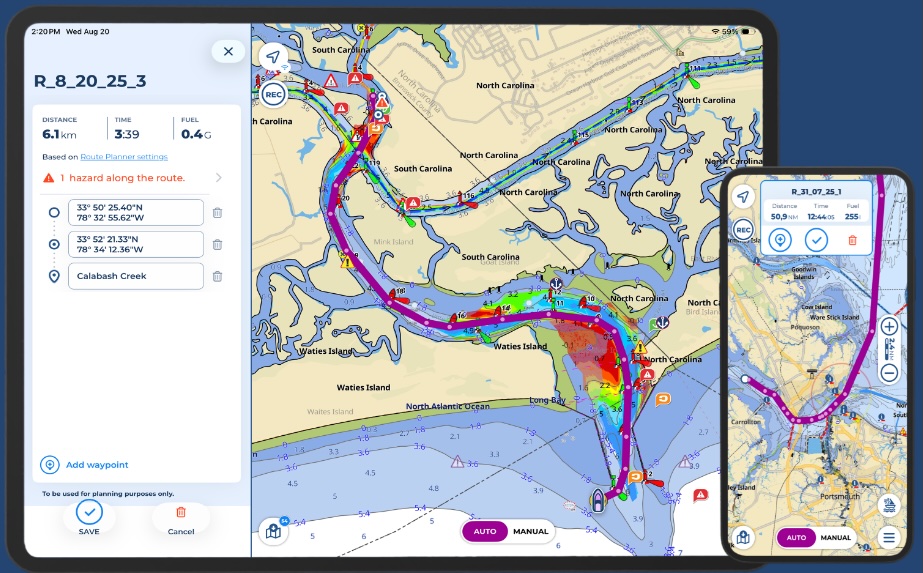
Aqua Map is pleased to announce the launch of Route Planner, a multifunctional route planning tool that offers navigators enhanced control and flexibility. By combining Automatic and Manual planning modes, Route Planner allows seamless switching between them within the same route. This hybrid routing capability enables users to customize and combine manual and automatic segments, or fully manual or fully automatic routes, providing precise control.
Key features include:
- Automatic and Manual Planning Modes: Seamless switch between manual and automatic planning modes from within the same route.
- Use existing tracks as guides: Reference tracks and routes that are visible on your charts as a guide in creating of new routes.
- Hazard Detection while planning: Navigational hazards are automatically identified in both planning modes. Hazards remain visible while planning and during active navigation and within the Route Explorer.
- Integrate Local Data into Automatic planning: Incorporate US Coast Guard Data (List of Lights) and additional layers such as US Army Corps of Engineers surveys to enhance your route calculation.
- Display extra data while planning: Display overlays from marine forecasts and satellite imagery, tides and currents, community POIs from Active Captain and Waterway Guide.
- Quick search: Easily find and add specific locations, custom markers, or points of interest to your waypoint list.
“We’re looking forward to introducing this update to route planning that gives our users more control and integrates both Automatic and Manual route planning modes to enhance their planning experience in Aqua Map,” said Enrico Valle, CEO & Co-Founder at GEC srl, developers of Aqua Map. “Route Planner helps navigators make smart decisions with all the essential data in one place to enjoy safer journeys.”
Route Planner is now available to all Aqua Map users. New users can explore any chart subscription and our set of advanced tools with a free 14-day trial (availability may vary by location).
For more information and to download the app, visit www.aquamap.app.
Panbo publishes select press releases as a service to readers and the marine electronics industry. The release contents do not reflect the opinion of the editors and are not fact checked by the editors


Aqua Map was, until now, one of the last holdouts on implementing auto routing. I understand why they did it and agree with much of the sentiment, but I think commercial realities forced them to add the feature. I have played with it a little bit and so far it looks fast and, in my very limited testing, accurate. I expect that, like other autorouting tools, there will be plenty of examples of the feature run amok. But, time will tell. I’m looking forward to some time on the water in the coming days with it.
-Ben S.
Good morning Ben,
I use AquaMaps exclusively for my routing. Currently in Maine and used AquaMaps from Florida all the way up. Absolutely no issues but manual input of daily routes did become somewhat laborious,
We are starting our downhill run from Boothbay Harbor to New Bern, NC tomorrow morning.
I will use the autoroute feature as we go forward and try to remember to report back about what works and what doesn’t.
– John M.
Hello All,
I have had the pleasure of being an Auto Route tester for the last 3 months or so and have used it extensively on our inland travels from Knoxville TN to the North Channel in Lake Huron.
The route planner has always been one of the very strong features of AquaMap. On the inland rivers the route planner is very valuable as you need to know about bridges and their height, marinas, fuel, anchorages, obstructions, etc…. In the past laying out routes on the rivers for route planning purposes has been extremely laborious do to the very winding path requiring you to lay a zillion manual way points. Auto Routing solves this problem.
Route planning on the rivers is now a breeze. Just do a long push somewhere up/down river to create an auto route and voila now you can use that route with the route planner to plan your voyage for the day. Easy as 1, 2, 3…
So… even though you might not use the auto route for actually driving your boat it is invaluable for route planning.
Once in the Great Lakes we have been using the auto routing feature to lay all of our routes and the auto pilot feature to drive the boat. I have stopped using my very expensive 2x Simrad 16″ NSS Evo 3 displays for routing, navigation, and autopilot function. We have a dedicated iPad in the pilot house that takes care of that. The MFDs are now used for cameras, hi res navionic charts, radar, sonar, instrument status, etc… Pretty amazing really.
The inland water way cruisers thank you AquaMap for releasing this very important feature!
–Luis
Initial results using Aqua Maps Auto Route are mixed.
1. Routed from Fishers Island, NY to Port Jefferson, NY and route was acceptable save for cutting the # 2 red by South Dumpling island and taking me over a rock with 4.8 @ MLLW. Easy fix but can’t understand why it would cut the marker leaving the harbor with my draft setting for my boat info at 4’8”. To me this is way too risky.
2. It totally lost its mind in the North end of the Barnegat Bay. In fairness nobody really should be going through this area on Labor Day weekend anyway because, well, it’s New Jersey, but be that as it may I do need to map a route through the Manasquan Inlet and down to Mantoloking, NJ. (I’m allowed to say this because I’m from New Jersey and if you got a problem with it you can fuhgettaboutit).
This is probably one of those areas that absolutely must be done manually. The shallows are really wicked. When we came out of there on our way up I must say that the depths were pretty spot on and we had no trouble as long as we stayed directly on the track. Aqua Maps charting to me is a game changer in a + way. With USACE enabled you really have to be distracted on your phone or watching the pretty houses along the way to screw up. Yes, shoaling will shift and markers move, but if you’re focused I haven’t been led astray yet. Watching the tides and not trying to transit at dead low, is of course, highly recommended and I haven’t tested the USACE surveys by running at dead low so take this with a grain of salt.
I’m pleased with the Auto Route so far but I’m still hyper vigilant about my routes and check them as meticulously as possible. Call me old school, or too cautious, but I’m comfortable with this and everyone has their own way of doing things that I don’t want to critique.
On another note I wholeheartedly agree with Ben Stein and Stick Higginbotham that allowing autopilot to run your vessel over a route/course is an invitation for disaster. I’m a set heading hold guy and then watch the progress like a hawk. My boat does NOT do any turning on its own save for changing the heading on the autopilot compass to the number I enter. I feel that by setting a route and sitting back and watching the computer do its thing it’s too darn easy to get distracted and pulled away from focusing by thinking “oh it’s OK, the computer’s got this.”
No Deal for me. I want to enter all the course changes even though it’s some more work.
I’ll continue to post my findings as I progress down the coast to New Bern, NC. Our southern destination for this winter as our marina in Lantana, FL fell apart and we were politely asked to leave with no answer as to whether or when or if they would rebuild.