
Category: Navigation

Gizmo Thanksgiving, & the Garmin 740 networked 22
Gizmo Thanksgiving, & the Garmin 740 networked

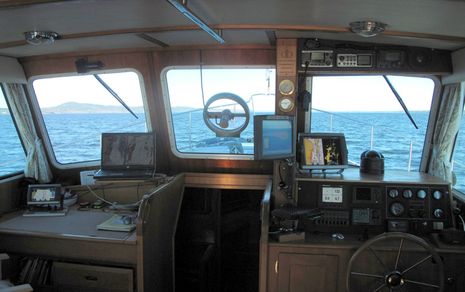
Gizmo_lower_helm2_fall_2010_cPanbo.JPG

It’s about to be Thanksgiving here in the states, and — aside from the normal family stuff (which is huge) — I surely am thankful for being the custodian of a wonderful boat, for living in a beautiful corner of the oceans, and for getting to fool with some great technology.  Above is Gizmo’s lower helm, the Fall 2010 edition, and while there’s a lot here that I haven’t written about yet, I’m going to focus today on that little Garmin GPSMAP 740 on the chart table…
DAME Awards 2010, part 2 2

DAME Awards 2010, part 2

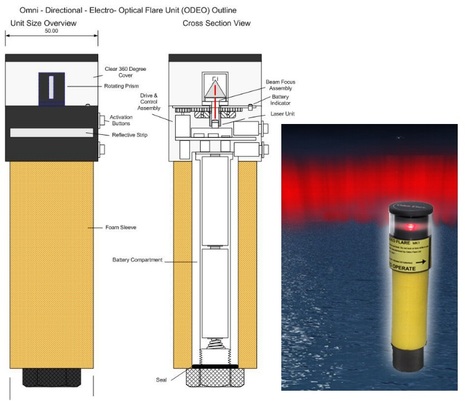
ODEO_laser_flare.JPG

DAME Awards will be chosen at METS this coming week for multiple categories, but there are electronical things well beyond the main marine electronics category discussed on Thursday.   Consider, for instance, how the ODEO Flare seen above attempts to replace pyrotechnics with four lasers and a revolving prism.  It does cost almost 100 pounds, but purportedly stays lit for 10 hours on 2 AA batteries, and it won’t burn you.  Also in the Lifesaving and Safety Equipment category are SeeTrac’s Jet-trak high-end PWC tracking system, McMurdo’s SmartFind S5 AIS SART, and Weatherdock’s easyRescue, which seems to be a personal-size AIS SART.  And of course there’s the Marine Related Software category…

Nobeltec VNS & Admiral 11, the preview 5

Nobeltec VNS & Admiral 11, the preview

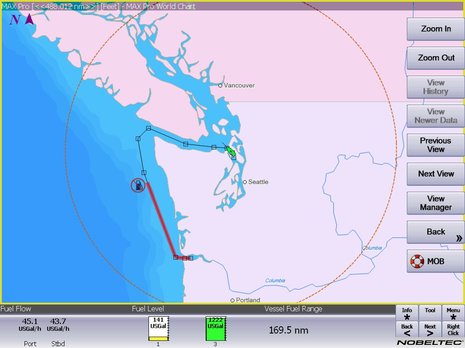
Nobeltec_NavView_Fuel.JPG

Real time fuel range — as when it’s calculated using actual fuel flow and tank levels — is darn useful information; for instance, it should let you instantly see the effects of RPM or sea state changes not only on your MPG but also on your ability to get somewhere without a forced stop.  Which is why it’s neat that the Nobeltec 11 preview screen above shows the value as a number, as a circumference from your present position, and even as a distance along your active route.  And there’s an implication to this screen that I’m sure many of you will welcome (and may have already figured out)…

More on iPad as extra nav screen, from Nobeltec 11

More on iPad as extra nav screen, from Nobeltec

Nobeltec_Admiral_on_iPad_courtesy_Nobeltec.JPG

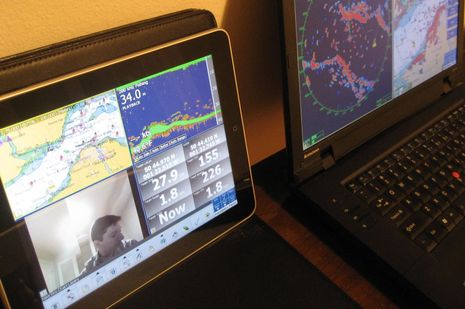
It’s not just the new edition of Coastal Explorer that can play nicely with an iPad.  In fact, it turns out that anyone running Nobeltec Admiral v6.5 or higher can get their iPad to show a variety of independent screens like the one above.  That’s because Admiral has long supported the extended desktop capabilities of Windows, as well as touch screens.  But Nobeltec Product Manager Bill Washburn, glimpsed in his own camera above, warns that screen refresh rate is marginal, at least at this point…

Coastal Explorer Express & 2011; hello subscription model 27

Coastal Explorer Express & 2011; hello subscription model

Coastal_Explorer_Express_cPanbo.JPG

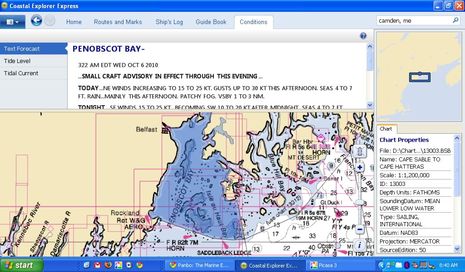
Rose Point Navigation showed off numerous new products and features during the NMEA Conference, as mentioned on Tuesday, but it make take a while for me, or anyone, to sort them all out.  This is especially true as the company has both a “relaxed” marketing style and a tendency to put product perfection over actual shipping dates.  For instance, a week after issuing a stack of press releases, there’s not yet a peep about them on Rose Point’s home page, but instead a link to a “sneak peak” (sic) at Coastal Explorer 2010, a product that will never actually be released!  What is new on the site is info about the heavily stripped down new version of CE called CE Express, which was announced last February in Miami but in fact is the first CE 2011-style software to ship.  Except that the Google Earth-like chart zoom slider seen above in the copy of Express I downloaded last week has already been replaced in the ongoing CE 2010 beta…

Geonav, the giant roll out 17

Geonav, the giant roll out

Geonav_GIS_MID_Console.JPG

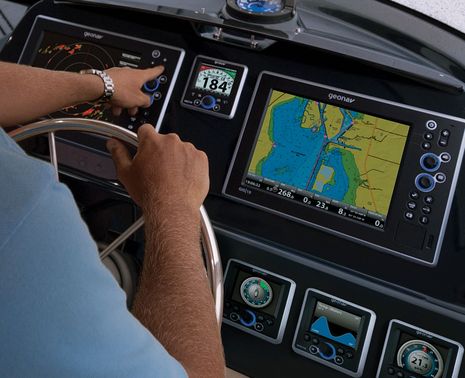
Geonav has been talking about a Fall U.S. roll out for some time, but now it’s turning out they have a lot more to show than the G12 and G10 MFDs introduced in Europe last year.  Seen in the photo above is an even newer model called the GIS10, and while it and the 12-inch model include most all the features seen online for the G series, they also support NMEA 2000, Gigabit Ethernet, and, yes, the Side Imaging technology pioneered by sister company Humminbird.  And how about those sexy MID 110 multifunction instrument displays (and the matching autopilot head)?

B&G Zeus, Simrad NSE for sailors 17

B&G Zeus, Simrad NSE for sailors

B_G_Zeus_GRIB_display.JPG

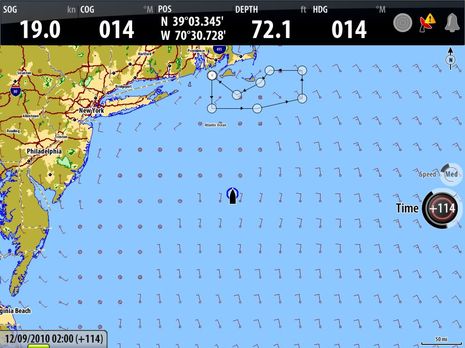
Though it’s not mentioned anywhere, there’s no question that B&G’s new Zeus multifunction displays are re-branded Simrad NSE MFDs, with some special software sauce on top.  But that’s a good idea.  NSE has a lot going for it, and the more ways Navico finds to expand its scope — like the Simrad NSO system, also “soft launched” in Newport last week — the better for everyone, I think.  Besides, has there ever been an MFD that can do the jobs performance sailors usually use PCs for — like animate GRIB weather files, display data strip charts, and calculate lay lines?

Simrad NSO, the NSE series goes big 17

Simrad NSO, the NSE series goes big

This week in Newport, and in Southhampton, Simrad introduced the NSO Navigation Series, a black box version of the NSE system, and while it’s hard to imagine an MFD faster than an NSE, even...

Garmin radar features, a hit and a miss? 4

Garmin radar features, a hit and a miss?

Garmin_radar_nav_aid_display_cPano.JPG

Here’s a nifty feature I’d never seen before.  I had already realized that if you click on a nav aid when making a route on a Garmin MFD, the waypoint gets named after the aid.  I find that useful, even if I first came across the feature years ago and think other current MFDs and charting programs include it (anyone remember which ones?).  But I was darn surprised yesterday morning to see that the Garmin 7212 can overlay the nav aid’s complete icon and label on its standard radar screen, if desired.  I like that a lot…